

Cloud computing models refer to the on-demand delivery of resources like servers, storage, software, databases, and networking over the internet.
Unlike the traditional model, where you have to buy hardware and maintain it even when you are not using it. In cloud computing, you only rent what you need and pay according to your usage. Cloud computing can be availed via two models, Service and Deployment.
What Are Cloud Computing Service Models?
Service models in cloud computing define how much of the work falls on the consumer’s and the provider’s plate. Each model has its own upsides and downsides and serves a different consumer category.
.png)
1. IaaS
IaaS, known as Infrastructure as a Service, provides you with virtualized physical resources. These resources include computing systems (CPU, RAM, and GPU), storage systems (objects and blocks), and networking systems (IP addresses, firewalls, etc.).
In IaaS, the service provider owns and maintains the physical infrastructure. But if you have to build everything else from scratch to actually make it work, by installing your own OS, configuring the system, etc.
Key features of IaaS
- On-demand scaling: Upgrading the infrastructure takes less than a minute. Unlike physical hardware, all resources are on-demand and can be upgraded and allocated to you almost instantly.
- Usage-based pay: You get billed per hour or per second for compute use, storage, and network bandwidth. You are not maintaining depreciating assets if you are not using them enough.
- Scaling Flexibility: It’s convenient to scale in IaaS, whether horizontally (more Virtual Machines)or vertically (Bigger Virtual Machines), based on your traffic needs. It can be done manually or via auto-scaling algorithms.
- Freedom of provisioning: Your system admin or developer can easily provision resources according to their needs through the API dashboard without having to raise a procurement request.
Responsibility Split
In IaaS, the responsibilities between the user and provider are split as follows:
- User: Installing Operating Systems, Installing Security Patches and Updates, managing application runtime, network configuration, user access protocols, and data.
- Provider: Physical Servers and their maintenance, data center facilities, and uninterrupted networking supply.
Pros and Cons of the IaaS model
Pros
- Maximum flexibility among other cloud computing options
- You can run your own OS without any proprietary software restrictions
- Minimal to zero upfront capital expenditure
- Best to choose in case of medium to large corporations, as regulatory compliances require region-based implementations.
Cons
- Needs a skilled IT workforce to implement everything from scratch. If not built and managed carefully, the whole system can be compromised.
- You are the one responsible for system vulnerabilities, misconfigured firewalls, and compromised systems.
- Cost can pile up if the system is not built efficiently and unused VMs or storage systems are kept running.
- Steep learning curve for enthusiasts or small ventures.
2. PaaS
PaaS, known as Platform as a Service, is another cloud computing model where the provider provides you with a complete deployment and development environment.
You only have to provide and manage the code, rest (Operating System, runtime environment, servers, and networking) is managed by the provider.
Key features of PaaS
- Reduced infra management: OS Updates, server maintenance, and security patches are handled by the provider.
- Built-in scalability management: The provider monitors the traffic and load and scales the environment accordingly without any manual intervention.
- Multi-language support: Most PaaS providers support multiple programming languages and frameworks. You don’t have to perform a custom server configuration.
- Pre-built developer tools: Most PaaS providers come with built-in monitoring dashboards, caching layers, CI/CD pipelines, and authentication services.
Responsibility Split
- User: The application code, logic, data, and user access.
- Provider: Operating System, networking, runtime environment, and physical infrastructure.
Pros and Cons of PaaS
Pros
- Faster overall operation and deployment, as no infrastructure setup is needed before pushing the code to production
- Auto-scaling manages traffic surges without manual intervention
- Reduces staffing cost and operational workload
- Production teams can focus on product features rather than infrastructure configuration
Cons
- Lesser control than IaaS: You cannot customise the operating system or the runtime environment
- Platform Lock-in risk: Migrating away from certain platforms or app engines requires a lot of rework
- Reduced flexibility: Some platforms support a restricted catalogue of programming languages and frameworks
- Chain of Contact difficulty for infrastructural issues: It’s difficult to debug infrastructure-level issues, as support time and quality differ with providers
3. SaaS
Known as Software as a Service, SaaS provides a ready-to-use application delivered on different operating systems or browsers, depending on the service.
In SaaS, the provider handles everything, including the servers, code, updates, backups, and security patches. To use SaaS services, users usually have to create an account with the provider, which is used as an identifier, and the user can directly access the provided service online.
Key features of SaaS
- Fully provider-managed: The provider handles the entire infrastructure, applications, and all maintenance.
- Multi-platform access: Most SaaS services provide users with multi-platform access (Android, iOS, MacOS, Windows, Linux, and Web Browsers). This provides the user with a productive and synced ecosystem.
- Pricing: Most SaaS services offer fixed monthly or annual subscription pricing with different tiers based on the services provided.
- Multi-tenancy: Multiple Organisations can use the same application for all their employees, with data isolation.
Responsibility Split
- User: Account credentials and how they configure the app’s settings/environment.
- Providers: End-to-End service including OS, code, servers, networking, and server maintenance
Pros and Cons of SaaS
Pros
- Zero setup or configuration time for the user, immediately operational
- Updates are automatically pushed without user intervention
- Synced environment ensures you can access the application from any device and location
- Fixed monthly or annual costing, you don’t have to worry about usage-based variable bills
Cons
- Limited to no customisation, as you can only use what the provider provides
- Privacy and data sovereignty concerns due to the data being completely under the provider’s servers
- Integration with third-party services or existing systems depends on the provider’s choice
- Reliability issues, as you cannot do anything in case the service is down or under maintenance
Cloud Computing Deployment Models
Service models focus on the services you are getting, whereas deployment models focus on where the service runs and who has access.
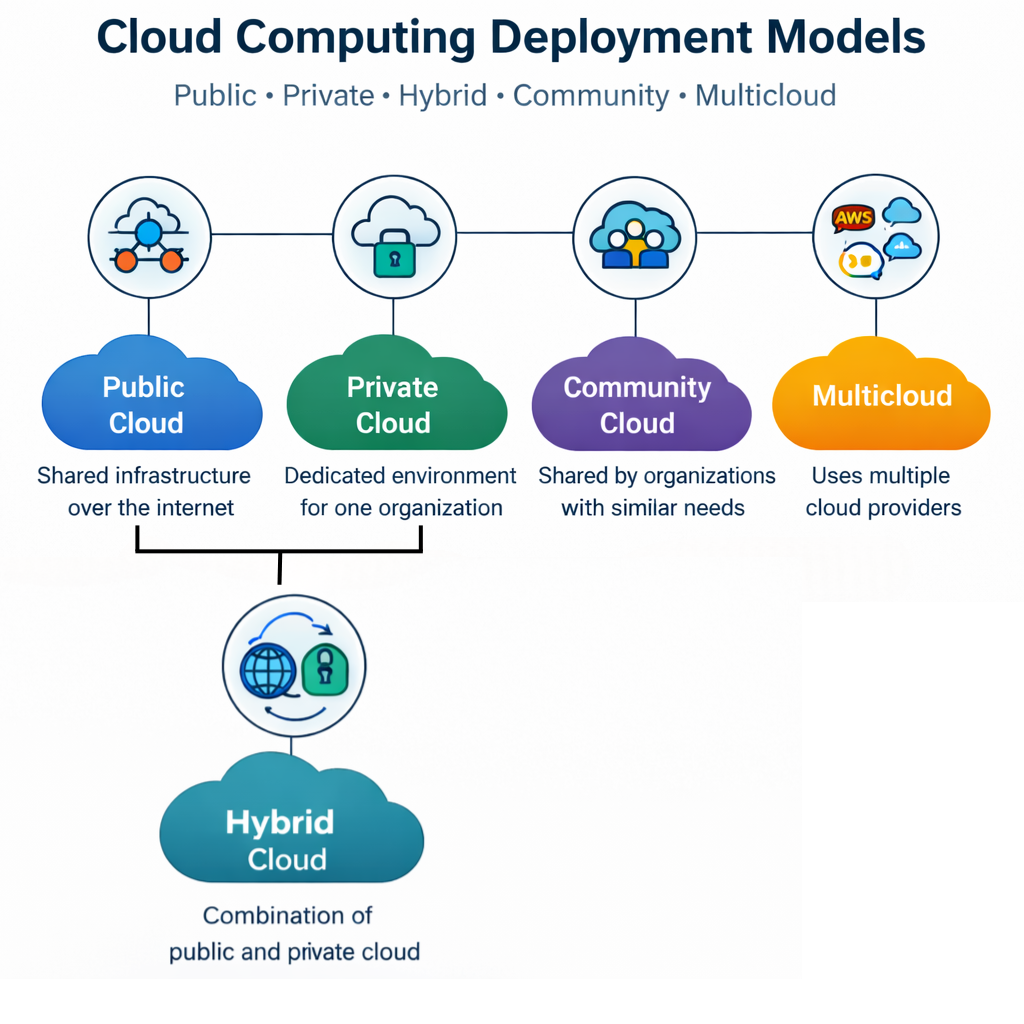
The company decides whether to run a SaaS on a private cloud or an IaaS on a public cloud. There are five deployment types: Public, Private, Hybrid, Community, and Multicloud
Public Cloud
In the Public Cloud deployment service, the infrastructure is owned and operated by a third-party cloud service provider. The service is delivered to multiple customers over the internet. The resources and application is shared across the customers, but the user-specific data is isolated.
The service provider manages hardware maintenance and uptime. The Billing is done according to the compute power and storage used
Pros and Cons of Public Cloud
Pros
- Scaling Flexibility: The provider automatically handles traffic surges and scales the environment accordingly
- No upfront capital investment needed: You only need to pay for the bandwidth you use
- Minimal Operational Liability: The service provider is responsible for the data center and hardware maintenance
Cons
- Data is stored on a third-party infrastructure, citing ownership and control concerns among consumers
- Not suitable for industries with strict data isolation requirements (banking, healthcare, law firms, etc.)
Private Cloud
In a Private Cloud environment, a single cloud infrastructure is dedicated exclusively to a single organisation. Everything can be hosted either in your own private data center or at a provider’s facility, but the data remains unshared.
The Organization has complete control over the software, network configuration, and hardware. The organization can choose to implement IaaS, PaaS, or SaaS privately, depending on its needs.
Pros and Cons of Private Cloud
Pros
- Customers’ sensitive data and information stay within the private infrastructure
- Easier to meet data compliance regulations like HIPAA, GDPR, etc.
Cons
- High capital investment cost as you need to buy new hardware, licenses, and manage facilities
- Requires a skilled IT team to manage and maintain the environment
Hybrid Cloud
A hybrid cloud is a combination of private and public cloud infrastructure. These are two distinct environments connected via a network. In a hybrid cloud system, workloads can easily move between environments based on the requirements.
Pros and Cons of Hybrid Cloud
Pros
- Cost-Effective: Once your private cloud capacity is exceeded, you only have to pay for the public cloud resources you utilize
- Easy Data Transferability: Data can be easily transferred with low latency between private and public tiers
Cons
- It is one of the most difficult deployment models to build and manage. Security policies need to be consistent across both public and private environments, which is complex to enforce.
- A hybrid cloud environment has a higher latency and operating cost
- Managing simultaneous billing systems (CapEx for private and OpEx for public is challenging
Community Cloud
Community cloud is a shared cloud infrastructure built for and by organizations with common requirements. These organizations share the operational cost and the infrastructure. It is usually managed by one of the member organizations or an operational third-party organization.
Mostly implemented in Government agencies, educational, financial, and healthcare institutions. Though the cloud is shared, the infrastructure is not open to the public.
Pros and Cons of Community Cloud
Pros
- For organizations with similar requirements, the community cloud is a great medium to reduce operational costs while still having a private cloud-like environment
- It meets industry-specific regulatory requirements for a group of organizations
Cons
- Only useful for organizations in the same industry having similar requirements
- All member organizations need to be on the same internal systems to avoid compatibility issues
Multicloud
A system that uses services from two or more public cloud service providers simultaneously is called multicloud. Multicloud services are essential to avoid vendor lock-in or excessive dependence on a single provider.
If one provider is facing an outage, the workload is distributed among other partner providers. It is often used in e-commerce platforms, media streaming sites, public forums, etc.
Challenges of Multicloud
- Increased complexity due to cross-platform development needs
- Security policies have to be applied consistently across multiple providers, increasing complexity
Cloud adoption is rapidly increasing as organizations move toward cloud-based models to reduce infrastructure costs and improve scalability. This shift has created strong and consistent demand for cloud professionals across industries.
With the growing use of cloud computing models, careers in cloud engineering are expanding quickly. Professionals skilled in cloud infrastructure, deployment models, and AI-powered cloud systems are among the most in-demand today. Understanding cloud engineer salary trends can help you evaluate career growth and make informed decisions about entering this field.
However, many conventional degrees do not fully equip learners with the practical skills required in modern cloud environments. This is where structured learning pathways like an AI engineering on cloud and AIOps program can help bridge the gap by combining cloud infrastructure with real-world AI applications.
TL;DR
Different service models are present in the market for different cloud computing deployment needs. You can always choose to implement a service that suits your requirements best. As cloud environments become increasingly complex, especially with AI integrations across various service models, engineers need specialized skills in cloud deployment.
Frequently Asked Questions About Cloud Computing Models
IaaS, PaaS, SaaS & Deployment Models
Cloud computing models refer to the different ways cloud services are delivered and deployed over the internet. They are mainly divided into service models (IaaS, PaaS, SaaS) and deployment models like public, private, hybrid, and multicloud.
What are the three cloud computing service models?
The three main cloud computing service models are IaaS (Infrastructure as a Service), PaaS (Platform as a Service), and SaaS (Software as a Service), each offering different levels of control and management.
What is the difference between IaaS, PaaS, and SaaS?
IaaS provides virtual infrastructure with maximum control, PaaS offers a development platform with managed infrastructure, and SaaS delivers ready-to-use applications with minimal user management.
What are cloud computing deployment models?
Cloud computing deployment models define where the cloud infrastructure is hosted and who can access it. Common types include public cloud, private cloud, hybrid cloud, community cloud, and multicloud.
What is a cloud computing reference model?
A cloud computing reference model explains how different cloud service models and deployment models interact within a cloud architecture to deliver services efficiently.


Advanced PG Certificate in AI Engineering on Cloud and AIOps
IIT Roorkee
Engineer AI Systems for Top Enterprises, with the Most Critical Skills of the Decade