

Are you curious to know how can a DevOps team take advantage of artificial intelligence? Well, AI can optimize workflows by automating processes and enhancing efficiency. Here is everything you need to know about it!
If an organization in today’s fast-paced world wants to attain high quality, reliable, and faster software delivery, then it has to rely on DevOps. That said, integrating AI in DevOps can be a game-changing strategy, particularly when we consider the increasing complexity of IT operations.
In this article, we are going to tell you some practical use cases of AI for DevOps. Along with this, we will provide you with insights into tools and workflows that teams can adopt today. So, whether you are a learner or an IT professional, you will explore here the different ways a DevOps team can implement AI for accelerating development cycles. So, let’s first understand DevOps and AI briefly.
What is meant by AI in DevOps?
DevOps is simply Development (Dev) plus Operations (Ops). Its purpose is to upgrade collaboration between IT operations teams and software developers. When we talk about AI in DevOps, then it refers to the infusion of machine learning, automation, and predictive analytics into the DevOps lifecycle. Thus, AI covers everything from coding and testing to deployment and production monitoring. This results in an increase in speed, quality, and reliability while toil and errors get decreased.
One related term is AIOps. It simply stands for Artificial Intelligence for IT Operations. It uses AI for the purpose of automating operations like root cause analysis, anomaly detection, and remediation. Thus, the operations get transformed from reactive to proactive.
How Is AI Useful For DevOps Teams?
Let’s see how DevOps teams are using AI in real world scenarios:
Smarter CI/CD Workflows
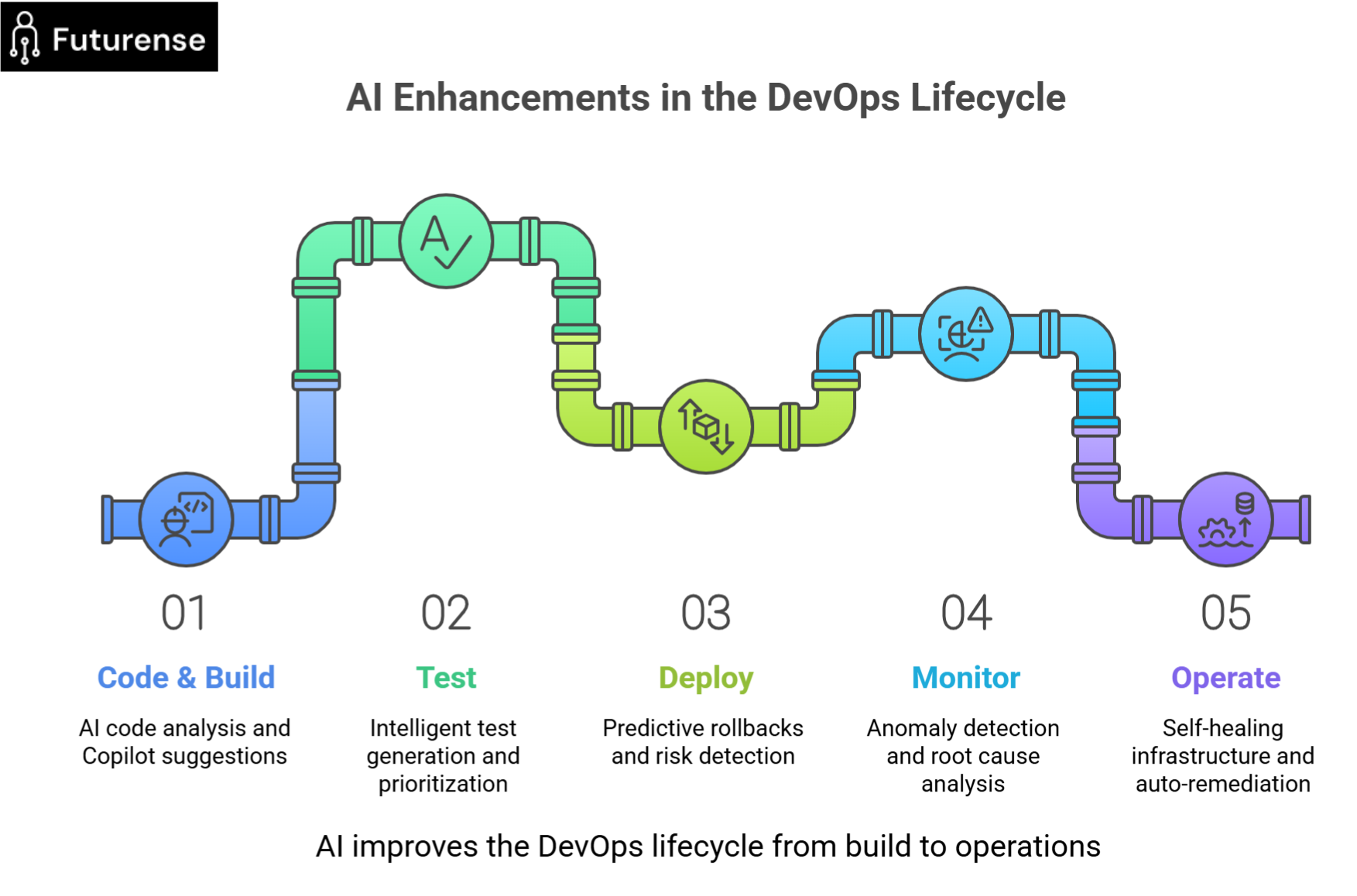
Artificial Intelligence-driven DevOps tools optimize continuous Integration and continuous deployment pipelines in the following manner:
- Predictive build and test outcomes minimize failed builds before they happen.
- They prioritize the tests based on previous failure patterns.
- When anomalies are detected, AI tools automate rollback decisions.
All this leads to faster releases and fewer manual interruptions. Along with this, teams achieve higher pipeline success rates also.
Automated Code Quality and Security Analysis
AI tools are much faster than manual reviews in identifying bugs, security vulnerabilities, style issues, and duplication in codes. Also, such tools catch these issues much earlier in the cycle, which reduces expensive late-stage fixes. The table below lists some of the popular roles that AI can perform for DevOps teams, along with some example tools:
Monitoring and Incident Alerting by AI
AI does not flood you with thousands of alerts. AI tools help you by:
- Detecting anomalies in metrics and logs.
- Alerting you only when the incident is meaningful.
- Suggesting probable root causes.
Let’s look at some tools in this space:
- Dynatrace: It analyzes the root causes by observing full stack using AI.
- Datadog: It offers predictive alerts and trace analytics.
- Splunk ITSI: You can use it for intelligent event correlation and insight.
Predictive Analytics for Performance and Reliability
Are you wondering how AI can predict failures before their occurrence? It does so by analyzing historical logs, telemetry, and usage. This is how it helps teams optimize resource usage and scaling. Thus, the AI benefits in this case include the following:
- Reduced downtime.
- Better capacity planning.
- Improved user experience.
Intelligent Testing and Self-Healing Pipelines
AI-powered test automation tools help with:
- Auto-generating and prioritizing test cases.
- Building self-healing tests that adapt to UI changes.
This thus results in automated testing with less brittle test suites and faster feedback loops.
Self-Healing Infrastructure
AI tools offer self-healing in the following ways:
- They identify and fix issues automatically.
- AI provides optimal performance with dynamic resource reallocation.
- It improves system resilience by reducing downtime.
AI-Driven Security
AI-driven tools assist DevOps teams against cybersecurity threats in the following ways:
- They offer real-time vulnerability detection.
- AI uses behavior analytics for preventing unauthorized access.
- It helps by automating compliance checks and threat response.
Which are the Best AI Tools for DevOps Teams?
We have mentioned below some of the widely used AI-powered tools across the DevOps lifecycle, along with their main strengths:
Practical Benefits of AI DevOps that You Can Measure
Let’s see how AI helps the DevOps teams in improving the following:
- Speed: AI enables faster CI/CD and smarter tests that leads to up to 30% faster deployment cycles.
- Quality: With AI tools, DevOps teams can have better code and fewer regressions. This will help in reducing bugs at release.
- Reliability: By predicting failures and detecting anomalies automatically, AI helps the DevOps teams to achieve up to 50% lower downtime.
- Efficiency: Automating manual tasks with AI can be really helpful for engineers. This enables them to focus on higher-value work.
- Security: Due to continuous vulnerability scanning using AI-driven tools, there is reduced attack surface over time.
Best Practices for AI Adoption in DevOps
If you are planning to deploy your first AI model, then follow the tips provided below:
- You should start small like you can choose predictive monitoring or code review automation before moving to full pipeline automation.
- You should always try to balance automation with oversight. Let AI suggest your decisions, but you need to keep humans in the loop for critical environments.
- Don’t forget to track metrics like MTTR (mean time to repair), deployment frequency, and pipeline success rates for better results.
- Implementing robust data governance policies is also important. By doing so you can ensure data security and compliance.
- Regularly update and fine-tune the AI algorithms if you want a successful integration of AI into DevOps.
For truly driving AI into DevOps just relying on tools is not enough as teams need skills too. So what can you do in this case? Well, you can consider going for a certification that can help bridge the gap between understanding AI concepts and using them strategically in DevOps environments. One such upskilling pathway for mastering both AI fundamentals and applied AIOps workflows can be the AI Engineering on Cloud and AIOps Certification Course.
Final Words
So, we now have discussed the top use cases of artificial intelligence in DevOps. It should now be clear to you that AI transforms DevOps from reactive to proactive. With meaningful automation both the quality as well as speed are improved. So, the DevOps Teams that are equipped with AI skills, automatically outperform their peers in competitive environments. For better AI DevOps integration results, you can follow the above provided best practices.
Apart from the AI tools, skills are equally important to get the full benefits of AI in DevOps. So, a proper upskilling course from a reputed institution like IITs can really help as AIOps is where DevOps meets strategic automation.
FAQs: DevOps and Artificial Intelligence
How can AI be used in DevOps?
AI can be used in DevOps to automate CI/CD pipelines, detect anomalies in logs and metrics, predict failures, optimize testing, and enable self-healing infrastructure through AIOps tools.
Can DevOps be taken over by AI?
No, AI cannot replace DevOps. AI supports DevOps by automating repetitive tasks and providing insights, while humans still handle system design, decision-making, governance, and complex problem-solving.
Which AI is better for DevOps?
There is no single “best” AI for DevOps. Tools like Datadog, Dynatrace, Splunk ITSI, GitHub Copilot, and Amazon CodeGuru are commonly used, depending on monitoring, automation, coding, or AIOps needs.
How to use AI agents in DevOps?
AI agents in DevOps are used to monitor systems, analyze logs, trigger automated remediation, optimize resource allocation, and assist engineers with intelligent recommendations across the DevOps lifecycle.


Advanced PG Certificate in AI Engineering on Cloud and AIOps
IIT Roorkee
Engineer AI Systems for Top Enterprises, with the Most Critical Skills of the Decade

.avif)