

A fancy term, DevOps, is changing the world as we see it. DevOps stands for Development and Operations. This terminology in modern days helps automate, accelerate, and secure the software development lifecycle to deliver high-quality, reliable features faster. This shift is driven by the right set of DevOps tools that automate workflows, improve collaboration, and bring consistency to development and operations.
Let us dive in to understand crucial DevOps tools and their contribution towards DevOps pipelines, segregating performance and stability. Automation of technology is a key, and to do so, understanding the right execution and deployment is a necessity.
What Are DevOps Tools?
Understanding the right requirements of tools for the execution of IT-based software helps in organizing teams better. DevOps tools are software solutions that help teams automate, manage, and streamline the entire software delivery process from writing code to deploying and monitoring applications in production. The current trend offers automation at the core of DevOps tools.
The two major terms to enable these are Continuous Integration (CI) and Continuous Deployment (CD). CI/CD automates infrastructure setup and supports faster, repeatable deployments. This reduces errors, shortens release cycles, and ensures consistency across environments.
Continuous Integration (CI)
CI basically helps in focusing on the integration of code in a shared repository for frequent code integration and testing. This ensures automated workflows run and validate changes, and ensures the codebase stays stable and that the issues are caught early.
Key CI activities include:
- Automatic code builds
- Unit and integration testing
- Code quality and security checks
- Early detection of bugs and conflicts
CI helps teams avoid last-minute failures by fixing problems as they arise.
Continuous Deployment (CD)
Continuous Delivery ensures that code passing CI checks is always ready for release. Deployments are automated and consistent across environments. In Continuous Deployment, changes go live automatically; in Continuous Delivery, a manual approval step may exist.
CD typically covers:
- Automated deployments to staging or production
- Environment configuration and consistency
- Rollbacks and release control
DevOps CI / CD Pipeline: Stages, Tools, and How Teams Use Them
Code Commit → Build → Automated Tests → Quality & Security Checks → Deploy to Staging → Deploy to Production
- Code Commit: Developers push code changes to a shared repository (GitHub, GitLab, Bitbucket).
- Build: The application is compiled, and dependencies are packaged automatically.
- Automated Tests: Unit and integration tests run to catch bugs early.
- Quality & Security Checks: Code quality, vulnerabilities, and compliance are validated.
- Deploy to Staging: The application is deployed to a pre-production environment for final validation.
- Deploy to Production: Approved code is released to live users with minimal downtime.
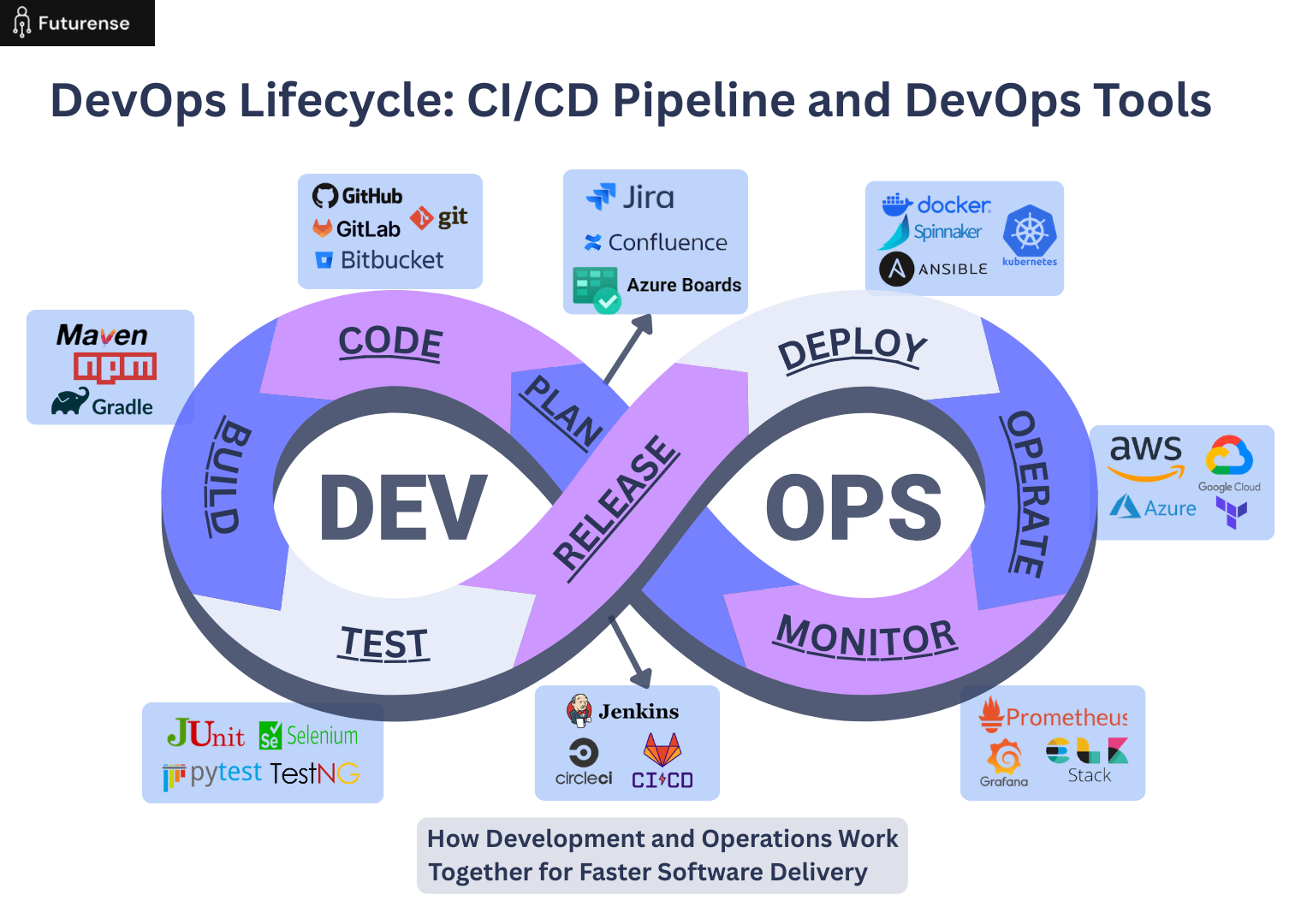
DevOps Tools: CI/CD Distribution and Team Integration
Modern software development relies heavily on automated DevOps pipelines to improve release speed, maintain code quality, and ensure system reliability. Continuous Integration and Continuous Deployment (CI/CD) pipelines help teams automate building, testing, deployment, monitoring, and infrastructure management processes. These tools enable faster collaboration, reduce manual errors, and support scalable application delivery.
The table below highlights key pipeline stages, commonly used DevOps tools, and how DevOps engineers utilize them across the software delivery lifecycle.
Monitoring Tools in DevOps by Category
Modern DevOps teams rely on a wide range of tools, each designed to support a specific stage of the software delivery lifecycle. Instead of using everything at once, teams typically choose a focused stack based on their scale, cloud strategy, and workflow maturity. Below is a clear, category-wise DevOps tools list that most startups and enterprises actively use today.
Version Control: Git, GitHub, GitLab, Bitbucket
- Create feature branches for new development work
- Commit and push code changes regularly
- Raise pull/merge requests for code review
- Collaborate with team members through comments and reviews
- Maintain version history and enable rollback when needed
- Trigger CI pipelines automatically on code changes
CI/CD Tools: Jenkins, GitHub Actions, GitLab CI, CircleCI
- Automatically start DevOps pipelines when code is pushed
- Build and compile applications without manual effort
- Run unit, integration, and regression tests
- Perform automated quality and security checks
- Deploy applications to staging or production environments
- Enable faster releases with reduced deployment risks
Configuration & Infrastructure as Code (IaC)
- Define infrastructure setup using code instead of manual steps
- Provision servers, networks, and cloud resources automatically
- Ensure consistent configuration across environments
- Reduce human errors in server setup
- Easily scale infrastructure by updating code
- Support version-controlled infrastructure changes
Containerization and Orchestration: Docker, Kubernetes
- Package applications and dependencies into containers using Docker
- Ensure consistent application behavior across environments
- Deploy and manage containers using Kubernetes
- Automatically scale applications based on traffic
- Handle container failures and self-healing
- Support rolling updates and zero-downtime deployments
Cloud Platforms: AWS, Azure, GCP
- Host applications and backend services
- Use managed services for databases, storage, and networking
- Integrate CI/CD pipelines with cloud infrastructure
- Enable auto-scaling for performance and cost efficiency
- Monitor usage, logs, and system health
- Support global deployments with high availability
Collaboration & Tracking: Jira, Confluence
- Plan and track tasks, bugs, and sprints in Jira
- Manage DevOps workflows and release planning
- Document system architecture and processes in Confluence
- Maintain runbooks and deployment guides
- Improve communication across Dev, Ops, and QA teams
TL;DR
DevOps tools work together to automate and simplify the entire software delivery process. Version control tools manage and track code changes. CI/CD tools automate building, testing, and deploying applications. Infrastructure-as-code tools consistently handle server and cloud setup.
Container and orchestration tools ensure applications run reliably across different environments. Cloud platforms provide scalability and availability. Collaboration and tracking tools help keep teams in sync. Together, these tools enable teams to release software faster, reduce errors, improve reliability, and scale systems effectively.
FAQs: DevOps Tools
What tools are used for DevOps?
DevOps uses tools for version control, CI/CD, automation, containerization, and monitoring. Popular tools include Git, GitHub, Jenkins, Docker, Kubernetes, Terraform, Prometheus, and Grafana.
What is the DevOps tool?
A DevOps tool is software that helps automate and manage software development, testing, deployment, infrastructure, and monitoring. DevOps typically uses multiple tools together as part of a toolchain.
What are the 7 C’s of DevOps?
The 7 C’s of DevOps are Continuous Development, Continuous Integration, Continuous Testing, Continuous Deployment, Continuous Monitoring, Continuous Feedback, and Continuous Operations. These stages help teams deliver software faster and more reliably.
Is Jira a DevOps tool?
Jira is not a DevOps automation tool, but it supports DevOps workflows by helping teams plan projects, track issues, manage releases, and improve collaboration between development and operations teams.


Advanced PG Certificate in AI Engineering on Cloud and AIOps
IIT Roorkee
Engineer AI Systems for Top Enterprises, with the Most Critical Skills of the Decade

.avif)