
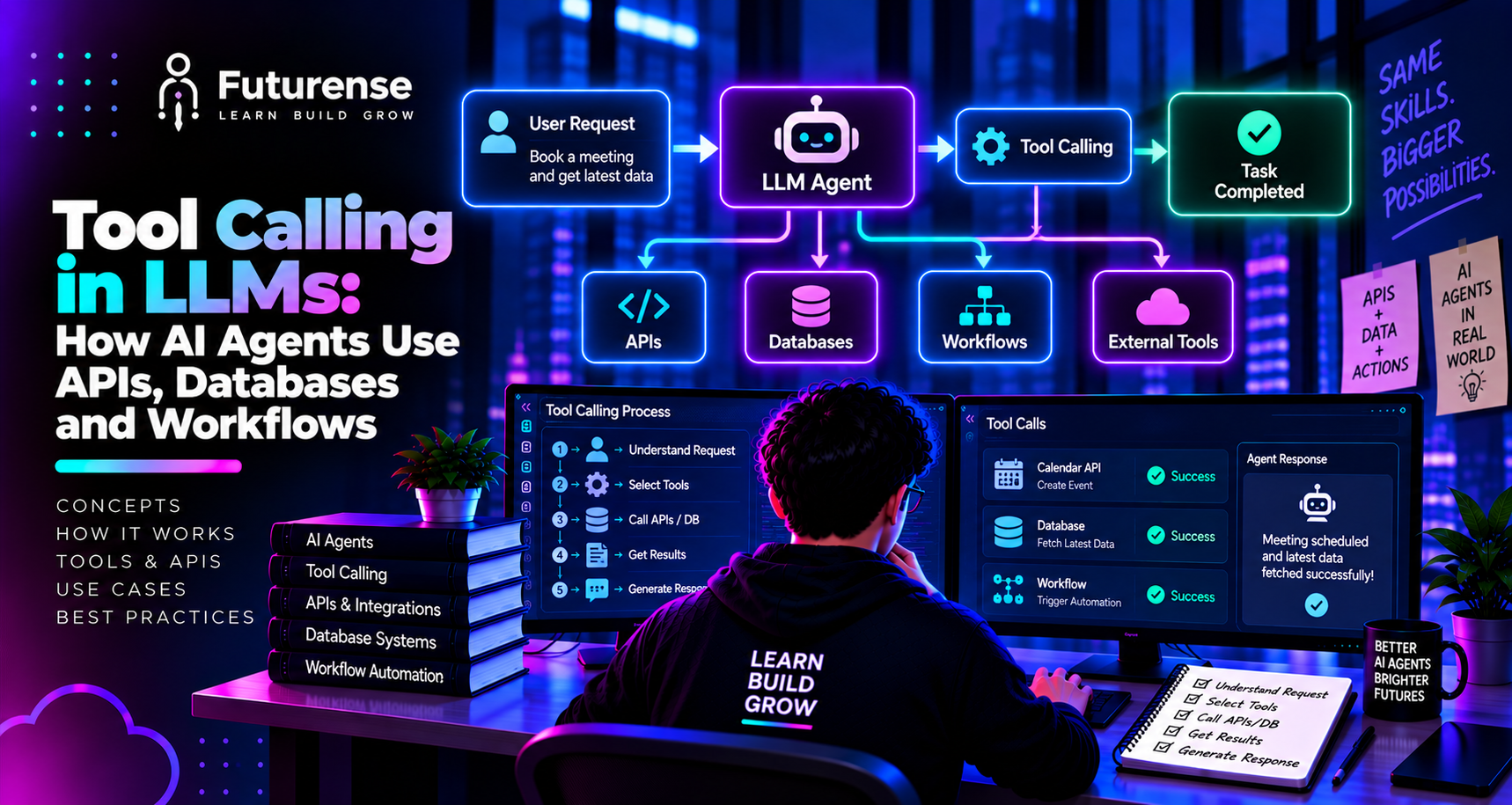


Why Language Models Need Tools
A language model on its own can only produce text based on what it learned during training. It cannot check today's weather, look up an order, read your company database, or send an email. It also guesses at facts it doesn't know and can't reliably do exact arithmetic or retrieve live data.
Tools fix that gap. By letting the model request actions from the outside world, an application can ground answers in real data and let the model do real work. If you want a refresher on the underlying technology first, start with what an LLM is. Tool calling is also the capability that separates a plain chatbot from AI agents, which plan, act, and observe results in a loop.
What Is Tool Calling in LLMs?
Tool calling, also called function calling, is a technique where a language model outputs a structured request to use an external function instead of answering directly, and the application executes that function and returns the result to the model. The model decides which tool to use and with what arguments. The application does the actual work.
The terms "tool calling" and "function calling" are used almost interchangeably. Function calling is the older phrase, from when models could call individual functions. Tool calling is the broader term, since tools can include functions, search, code execution, or whole external services. The key point stays the same: the model proposes, your code disposes.
How Tool Calling Works, Step by Step
A typical tool calling loop has five steps.
Step 1: Define the Tools
You give the model a list of tools. Each one has a name, a plain-language description, and a schema (usually JSON Schema) describing its parameters. For example:
json
{
"name": "get_order_status",
"description": "Look up the current status of a customer order by its ID.",
"parameters": {
"type": "object",
"properties": {
"order_id": { "type": "string", "description": "The order ID, e.g. 'A1042'" }
},
"required": ["order_id"]
}
}
Step 2: The Model Decides
Given the user's message and the tool list, the model either answers directly or returns a structured call, such as get_order_status with {"order_id": "A1042"}. At this point, nothing has been executed.
Step 3: Your Application Executes
Your code checks that the requested tool exists, validates the arguments, and runs the real function: an API request, a database query, or a workflow trigger.
Step 4: The Result Goes Back
Your application sends the output back to the model as a tool result message.
Step 5: The Model Responds or Continues
The model uses the result to write the final answer, or requests another tool call. The loop repeats until the task is done.
This is the whole mechanism. Everything else, including agents, frameworks, and protocols, builds on this loop.
Parallel and Sequential Calls
Some tasks need several tools. If the calls are independent, such as fetching a user's profile and their recent orders, many models can request them together in one response, and the application runs them in parallel. If one call depends on another, such as reading a balance before approving a transfer, the calls chain across turns. Behaviour varies by provider and model, so test your own setup rather than assuming.
How AI Agents Use APIs, Databases and Workflows
Most real-world tools fall into three groups.
APIs
An API tool wraps a service the agent can reach: a weather lookup, a CRM, a payments system, a ticketing tool, or a search engine. The model supplies the arguments; your code makes the HTTP request with the credentials the agent is allowed to use, and returns a cleaned-up response. Keep the response small and relevant, because everything returned consumes the model's context.
Databases
Database tools let an agent answer questions from structured data. There are two common designs:
- Predefined query tools, such as get_customer_orders(customer_id). The developer writes and tests the query, and the model only fills in parameters. This is safer and more predictable.
- Text-to-SQL tools, where the model writes the query itself. This is flexible but riskier, so it needs read-only credentials, query validation, row limits, and blocks on destructive statements.
For unstructured knowledge, the equivalent is a retrieval tool that searches documents. When the agent decides when and how to retrieve, you get patterns like agentic RAG.
Workflows
A workflow tool triggers a defined process: create a ticket, send an approval request, start a data pipeline, or schedule a meeting. These often have side effects, which makes them the highest-stakes tools. They should be idempotent where possible, meaning that repeating the same request doesn't repeat the action, and they often need human approval.
How to Design Good Tools
Most tool-calling failures are not the model picking the wrong tool. They are the model building the wrong arguments or misreading what a tool is for. Good design prevents both.
- Name tools clearly. Verb-noun names such as search_orders or create_ticket are easy for the model to understand.
- Write descriptions that say when to use the tool. If two tools look similar, spell out the difference.
- Constrain parameters. Use enums for fixed choices, mark required fields, and describe formats with examples. Strict schema modes, where available, reduce malformed arguments.
- Keep the toolset small. Too many tools add confusion and cost tokens. Give an agent the tools its task needs and no more.
- Return structured errors. "Insufficient funds, balance 40" lets the model explain or recover. A vague failure does not.
- Trim outputs. Return what the model needs, not an entire database record.
Error Handling and Reliability
Tool calls fail in ordinary ways: timeouts, rate limits, bad arguments, empty results. A reliable loop handles them deliberately:
- Verify the function name against a registered list before executing. An "unknown tool" error often lets the model correct itself.
- Set timeouts so a slow tool cannot stall the agent.
- Retry transient failures with backoff, but only for idempotent tools.
- Validate outputs, not just errors. A "success" response can still contain an empty or misleading result.
- Cap the loop. Enforce step and token budgets in the application, not by trusting the model to stop.
Security: The Part You Can't Skip
Giving a model the power to act makes security central. The most important idea is that the model is not a security boundary. As one practitioner guide puts it, real security lives in your application code, not in the LLM's instructions.
The main threat is prompt injection, where text in a web page, email, or document tells the model to do something the user never asked for. Tool results are a prime delivery route, which is why prompt injection ranks at the top of the OWASP list of risks for LLM applications. Sensible defences include:
- Allowlist the tools each agent can call.
- Apply least privilege. An agent without a send-email tool cannot be tricked into sending email.
- Validate arguments beyond the schema. For example, block local or internal URLs in a fetch tool and destructive statements in a query tool.
- Check permissions per user, so the agent never reaches data the requesting person couldn't.
- Treat tool results as untrusted before they re-enter the model's context.
- Require human approval for irreversible actions such as payments, deletions, and external messages.
- Log every call for audit and debugging.
Tool design and human oversight work together; the same layered thinking appears in guides to human-in-the-loop design for agents.
Tool Calling, MCP, and Frameworks
Tool calling is the underlying mechanism. Other pieces make it easier to use at scale:
- Model Context Protocol (MCP) is an open standard for exposing tools and data to AI applications in a consistent way, so you don't write a custom integration for every pairing. See our explainer on the Model Context Protocol. MCP standardises how tools are described and discovered; tool calling is how the model asks to use them.
- Frameworks such as LangChain wrap the loop and provide ready-made integrations, while the choice between simple chains and graph-based control is covered in LangGraph vs LangChain.
- Orchestration coordinates multiple tools, agents, and steps; see AI orchestration, and how the tool layer fits among memory, reasoning, and feedback in AI agent architecture.
Monitoring Tool Calls in Production
Once an agent is live, you need to see what it is doing. Useful signals include which tools are called and how often, argument error rates, latency per tool, retry counts, cost per task, and the share of tasks that finish versus hit a step limit. Tracing each call from the user's request through every tool result makes failures diagnosable. This is part of the wider practice in AI observability.
Common Mistakes
- Believing the model executes tools. It only requests them. Your code runs them.
- Relying on the system prompt for safety. Instructions are not enforcement.
- Giving agents broad credentials. One compromised instruction then has wide reach.
- Using free-form text-to-SQL on production data without a read-only role and limits.
- Too many overlapping tools, which confuses selection.
- No validation of outputs, so bad data flows into the next step.
- No loop limit, which allows runaway cost.
- Skipping evaluation. Test tool selection and argument accuracy on real examples before launch.
Building a Career in Tool-Using AI Systems
Tool calling is one of the core skills behind modern AI engineering. Employers look for people who can design tool schemas, connect APIs and databases safely, handle failure paths, and measure agent reliability. A strong first project is a small agent with two or three tools, such as a database lookup and an email draft, with logging, validation, and an approval step. If you are mapping your path, begin with how to become an AI engineer and build outward from there.
TL;DR: Tool calling is the mechanism that lets a language model ask an application to do something, such as call an API, query a database, or trigger a workflow. The model never runs the tool itself. It reads a list of available tools, outputs a structured request naming one and its arguments, your code validates and executes it, and the result goes back to the model to continue. This loop is what turns a chatbot into an agent. This guide explains how the loop works, how agents use APIs, databases, and workflows, how to design tools well, and how to keep the whole thing safe.
What is tool calling in LLMs?
Tool calling is a technique where a language model outputs a structured request to use an external function, and the application runs that function and returns the result to the model. It lets models fetch live data, query databases, and trigger actions.
Does the LLM actually execute the tool?
No. The model only produces a structured request naming a tool and its arguments. Your application validates the request, runs the real function, and sends the result back.
What is the difference between function calling and tool calling?
They are used almost interchangeably. Function calling is the older term for calling individual functions, while tool calling is broader and also covers things like search, code execution, and external services.
How do AI agents use databases safely?
Prefer predefined query tools where developers write the queries and the model supplies parameters. If you allow text-to-SQL, use a read-only role, validate queries, limit rows, block destructive statements, and apply per-user permissions.
What is the difference between tool calling and MCP?
Tool calling is the mechanism by which a model requests a tool. The Model Context Protocol is an open standard for describing and exposing tools and data to AI applications consistently. MCP standardises the connection, and tool calling is how the model uses it.
How do you prevent prompt injection in tool-using agents?
Do not rely on the system prompt alone. Allowlist tools, give each agent the least privilege it needs, validate arguments, treat tool results as untrusted, check permissions per user, require human approval for irreversible actions, and log all calls.


PG Certificate in AI-Driven LLM, SLM & Agentic RAG Development
IIT Jammu
Learn to Build Domain-Specific LLMs, SLMs & Production-Ready RAG Systems

.png)