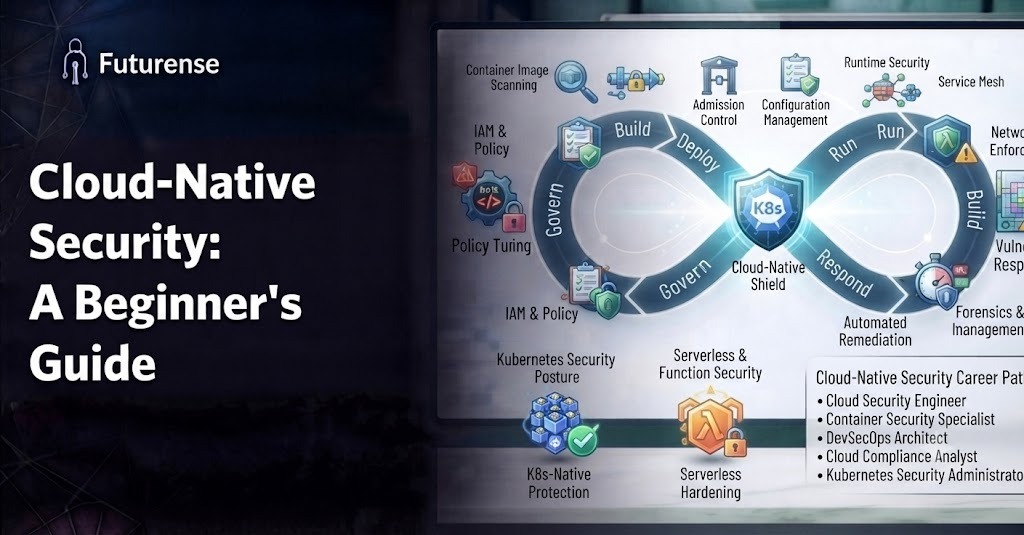


Cloud-native security, in plain terms, it's the practice of building security into applications that are designed to live in the cloud, rather than bolting security on after the fact. If you've ever heard the phrase "shift left" and wondered what it actually means in practice, cloud-native security is a big part of the answer.
Quick reality check before we go further: every top-ranking page on this topic right now is written for security professionals who already know the jargon. None of them start from zero. This guide does.
Why "Cloud-Native" Even Needs Its Own Kind of Security
Old-school security assumed a few things that just aren't true anymore:
- Applications lived on servers you could physically point to
- Infrastructure changed slowly, on a schedule, with a change-approval meeting
- "The network perimeter" was a real, defendable boundary
None of that holds in a cloud-native world. Applications are broken into containers and microservices. Infrastructure gets spun up and torn down by code, sometimes hundreds of times a day. There's no single perimeter to defend, because the "perimeter" is really a moving target made of APIs, containers, and orchestration layers.
That's the whole reason cloud-native security exists as its own discipline. It's not just "cloud security with extra steps." It's a different security model for a fundamentally different way of building software.
The 4Cs: A Simple Mental Model for Cloud-Native Security
Most explanations of cloud-native security throw a wall of terminology at you. Here's the one framework actually worth memorizing, because everything else in this guide hangs off it.
Security in a cloud-native environment operates in four nested layers:
Each layer needs its own security controls, and a weakness at any one layer can undermine the layers above it. A perfectly secure application (Code) doesn't help you if the container it's packaged in has a known vulnerability, or if the cluster it's deployed to has an overly permissive access policy.
What Are You Actually Defending Against?
Beginners often picture "a hacker breaking in" as the main threat. In cloud-native environments, the real risks are usually less dramatic and more structural.
Misconfigurations, not just malware: The single most common cause of cloud security incidents isn't a sophisticated attack. It's a storage bucket left publicly accessible, an overly broad permission policy, or a container running with more privileges than it needs. Cloud-native environments have so many moving, code-defined parts that a single misconfigured setting can quietly expose sensitive data for months.
Vulnerable dependencies inside containers: A container image is built from layers, and those layers often include open-source packages with known, publicly documented vulnerabilities. If nobody's scanning for them, they ship straight to production.
Overly broad permissions between services: Microservices talk to each other constantly. If Service A has permission to do things it doesn't actually need, and Service A gets compromised, the attacker inherits all of that unnecessary access.
Supply chain risk: Cloud-native applications pull in a huge number of third-party components, base images, libraries, CI/CD plugins. Each one is a potential entry point, and this category of risk has grown fast enough that it's now treated as its own specialty within the field.
Runtime threats that only show up after deployment: Some malicious behavior only becomes visible once a container is actually running, unexpected network connections, processes spawning that shouldn't exist. This is why cloud native runtime security (monitoring live, running workloads, not just scanning code before deployment) has become its own essential category rather than a nice-to-have addition.
The Core Practices, Explained Without the Jargon
Strip away the vendor branding, and cloud-native security best practices come down to a handful of consistent habits.
Scan early, scan often: Check container images, dependencies, and infrastructure-as-code templates for known issues before they're ever deployed, not after. This is the "shift left" idea in practice: catching problems while they're cheap and easy to fix, not after they're live in production.
Give services the least access they need, nothing more: This principle, called least privilege, sounds obvious but is routinely skipped because it's genuinely more work upfront. It pays for itself the first time a compromised service can't actually reach anything sensitive.
Watch what's happening right now, not just what was built: Static scanning catches known issues. Runtime monitoring catches the unknown ones, the behavior that only reveals itself once something is actually executing.
Automate compliance instead of checking it manually: Cloud-native environments change too fast for a quarterly audit to mean much. Automated policy checks that run on every deployment keep compliance continuous instead of a periodic fire drill.
Keep secrets out of code, always: API keys, credentials, and certificates should never live in a repository or a config file. They belong in a dedicated secrets manager, pulled in securely at runtime.
Treat security as a shared job, not a separate team's problem. This is less a technical practice and more a cultural one, but it's arguably the practice that determines whether all the others actually stick.
Tools You'll Hear About (and What They Actually Do)
Cloud native security tools tend to get lumped together under confusing acronyms. Here's a plain-language breakdown of the main categories a beginner will run into:
- CSPM (Cloud Security Posture Management): Continuously checks your cloud infrastructure settings against best-practice baselines, catching misconfigurations before they become incidents.
- CWPP (Cloud Workload Protection Platform): Focuses on protecting the actual running workloads, containers, virtual machines, and serverless functions, rather than the infrastructure around them.
- CNAPP (Cloud-Native Application Protection Platform): A newer, broader category that bundles CSPM, CWPP, and several other functions into a single platform, reflecting the industry's push toward consolidated tooling instead of a dozen disconnected point solutions.
- Container and image scanners: Tools that inspect container images for known vulnerabilities before deployment.
- Secrets managers: Dedicated systems for storing and distributing credentials securely, so they never end up hardcoded anywhere.
You don't need to memorize every acronym. You do need to understand what problem each category solves, because that's what lets you evaluate whether a given tool actually fits a given gap.
Who Actually Owns Cloud-Native Security?
Here's something beginners rarely get told directly: there's no single job title that owns this end to end. It's genuinely a shared responsibility, and understanding how DevOps engineering differs from software engineering helps explain why. In a cloud-native world, the people writing infrastructure-as-code, the people building the application, and the people running security tooling are often overlapping, sometimes the same person wearing different hats depending on the day.
That's part of why "DevSecOps" has become such a common term. It's less a specific job and more an acknowledgment that security can't sit in a separate silo anymore when infrastructure and application code are this tightly intertwined.
Getting Started: A Beginner's Path Into Cloud-Native Security
If this is genuinely new territory for you, here's a sensible order to learn things in, rather than trying to absorb everything at once.
- Get comfortable with the basics of cloud infrastructure first: Understanding cloud computing models, the difference between infrastructure, platform, and software as a service, gives you the mental scaffolding everything else attaches to.
- Learn general security fundamentals before the cloud-specific layer: Solid grounding in cybersecurity basics and confidentiality, integrity, and availability makes the cloud-native concepts click faster, since they're applications of the same core principles.
- Get hands-on with containers and Kubernetes basics: You can't meaningfully understand container or cluster security without first understanding how containers and orchestration actually work.
- Pick one tool category and go deep, rather than skimming all of them: Container scanning is usually the most approachable starting point for beginners, since the concept (check for known issues before deploying) is intuitive even before you understand the underlying mechanics.
- Look into structured learning if you want it formalized: There are genuinely useful certifications worth pursuing in security if you want a credential to anchor your learning and signal competence to employers.
Is This Worth Learning Right Now?
Short answer: yes, and increasingly so. Cloud-native architectures aren't a trend that's fading, they're how most new applications get built. That means cloud-native security skills are becoming less of a niche specialty and more of a baseline expectation for cloud and DevOps roles generally.
It also tends to pay well. Salary data for cloud engineers in India shows compensation climbing as cloud adoption grows, and security-adjacent skills consistently sit near the top of what commands a premium within that broader cloud engineering market.
TL;DR
Cloud-native security is the practice of securing applications and infrastructure built with cloud technologies such as containers, microservices, and Kubernetes.
Unlike traditional security approaches, it requires continuous protection across four layers: Cloud, Cluster, Container, and Code. The biggest risks include cloud misconfigurations, vulnerable dependencies, excessive permissions, software supply chain attacks, and runtime threats.
Key practices include shift-left security, least privilege, continuous monitoring, automated compliance, secrets management, and DevSecOps. For beginners, the best learning path is to start with cloud and cybersecurity fundamentals, then learn containers, Kubernetes, and cloud-native security tools.
What is cloud-native security in simple terms?
It's the practice of building security directly into applications and infrastructure designed for the cloud, using automated checks and continuous monitoring, instead of adding security as a separate step after everything's already built.
What are the 4Cs of cloud-native security?
Code, Container, Cluster, and Cloud, four nested layers that each need their own security controls, with weaknesses at one layer able to undermine the layers built on top of it.
Is cloud-native security the same as cloud security?
Not exactly. Cloud security is the broader umbrella covering securing anything in the cloud. Cloud-native security specifically addresses applications built using containers, microservices, and orchestration, which introduces threats and practices that traditional cloud security approaches don't fully cover.
What's the biggest beginner mistake in cloud-native security?
Treating it purely as a tooling problem. Buying a scanning tool without also fixing the underlying practices, overly broad permissions, secrets in code, inconsistent patching, just adds noise without meaningfully reducing risk.
Do I need to know Kubernetes to learn cloud-native security?
Not on day one, but you'll hit a ceiling quickly without it. Most real cloud-native security work assumes at least a working understanding of how containers and Kubernetes orchestrate workloads.
What tool should a total beginner start learning first?
A container image scanner is usually the most approachable entry point. The core idea, check for known vulnerabilities before something gets deployed, is intuitive, and it's a genuinely useful, widely applicable skill even before you go deeper into runtime monitoring or posture management.


Advanced PG Certificate in AI Engineering on Cloud and AIOps
IIT Roorkee
Engineer AI Systems for Top Enterprises, with the Most Critical Skills of the Decade.

.avif)