
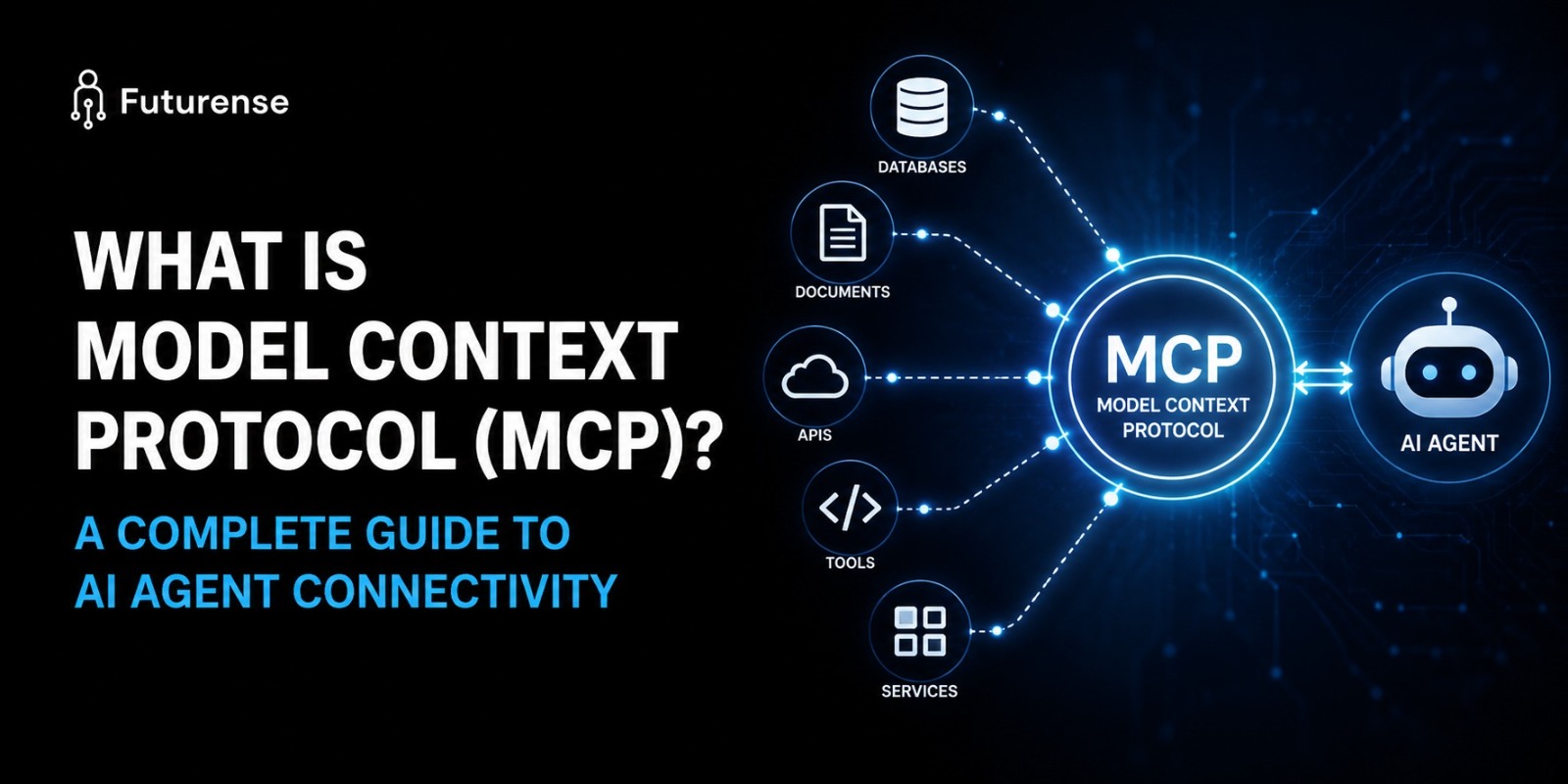


Model Context Protocol (MCP) is an open standard, originally released by Anthropic in November 2024, that defines how AI applications connect to external tools, data sources, and services. Instead of building a custom, one-off integration for every AI-tool pairing, developers get one shared protocol. Any MCP-compatible agent can discover and call any MCP-compatible tool; neither side needs to know the other's internal details.
You'll see this compared to USB-C everywhere, and the comparison earns its keep. Before USB-C, every device needed its own cable. After it, one connector works across phones, laptops, and monitors. MCP does the same job for AI agents and the tools they use.
This guide covers what MCP actually is, how its architecture works underneath the hood, how it compares to function calling and traditional APIs, and what learning it in practice actually involves.
Why AI Agents Needed a Standard Protocol in the First Place
Before MCP, connecting an AI agent to an external tool meant writing a custom integration for that exact model-tool combination. Want an agent to read a GitHub repo and then update a Notion database? That meant separate logic for both APIs.
Each new pairing brought its own headaches:
- A different authentication scheme to handle for every tool
- A different data format to parse and normalize
- A rewrite whenever you switched AI providers, since each one's tool-calling format is slightly different
That fragmentation was the real bottleneck behind "agentic AI." Models were already capable enough to reason about which tools to use. The hard part was always the plumbing connecting them to the real world and developers were spending most of their time on brittle, one-off integrations instead of on the agent behavior they actually wanted to build.
How MCP Works: Host, Client, and Server Architecture
MCP's architecture has three parts. Understanding them is the fastest way to actually understand the protocol.
The host is the AI application itself, Claude Desktop, an IDE like VS Code or Cursor, or a custom enterprise agent. This is what the user directly interacts with.
The client lives inside the host and manages the connection to each MCP server, handling the technical communication so the host application doesn't have to.
The server is where the actual capability lives: a dedicated adapter for one external system, like GitHub, Slack, or a database. Each server exposes three kinds of capability:
- Tools executable functions the AI can call, like search_web or write_file, based on what the user is trying to do
- Resources read-only data the AI can pull in as context, like a file, a database snapshot, or an API response
- Prompts standardized templates that keep how the AI interacts with a tool consistent across sessions
When a host connects to a server, the client asks what's available first, a discovery step traditional integrations simply don't have.
JSON-RPC: The Communication Backbone of MCP
Every message between an MCP client and server travels over JSON-RPC 2.0, a lightweight remote-procedure-call format built on JSON. It's not a new invention specific to MCP, it's a well-established standard MCP adopted because it's simple, language-agnostic, and already widely supported.
What this buys you in practice: a consistent request-response structure regardless of which tool you're calling or which language the server is written in. A Python-based MCP server and a TypeScript-based one speak the exact same wire format.
Transport Layers: stdio vs. Streamable HTTP
MCP supports two main transport layers, and picking the right one depends entirely on where your server lives.
- stdio used for local servers running on the same machine as the host, with near-zero communication overhead. This is the default for personal tools and local development.
- Streamable HTTP used for remote servers accessed over a network, supporting OAuth and standard web authentication. This is what enterprise and shared-team deployments typically use.
Both transports carry the same JSON-RPC messages underneath, so switching between them doesn't change how tools are defined, only how the connection itself is made.
Tool Discovery: How Agents Find What's Available
Discovery is arguably MCP's biggest practical advantage over older integration patterns. An MCP client can call a simple tools/list request to see everything a server currently offers.
If a server later adds or removes a capability, it can send a notifications/tools/list_changed message, and connected clients update automatically. No one has to touch the application code on the host side. That single feature is what makes it realistic to plug an agent into dozens of tools without maintaining dozens of custom integrations by hand.
MCP vs. Function Calling: What's Actually Different
This is the comparison developers ask about most, mostly because the two approaches overlap enough to cause confusion and because they're often used together rather than as substitutes.
Function calling keeps everything inside your application. Tool schemas are defined in your code, sent to the model with each request, and executed by your own logic when the model asks for them.
It's simple and fast to ship. But every tool definition is bound to a specific provider's format: OpenAI's function calling, Anthropic's tool use, and Google's extensions all describe tools slightly differently, so switching providers later means rewriting your definitions.
MCP separates tool execution into its own server. Instead of embedding a tool's logic in your app, you connect to an MCP server that exposes the tool through the standard protocol. Any MCP-compatible client can discover and call it without knowing how it was built internally.
Here's the difference at a glance:
A common production pattern uses both at once: function calling for tight, latency-sensitive work inside a single product, and MCP for shared infrastructure that multiple tools or agents need to reach.
If you're building one feature inside one product with a handful of tools, function calling alone is often simpler and faster to ship. If you're building tools meant to be reused across multiple AI clients or want to stay portable across model providers MCP is the better fit.
Why MCP Adoption Grew So Quickly
Three factors explain how MCP moved from a new Anthropic release in late 2024 to an industry-wide standard within about a year.
From Anthropic Release to Linux Foundation Governance
MCP solved a real, widely shared problem. Every team building agentic AI was independently reinventing the same integration plumbing; a shared standard meant that work only had to happen once per tool, not once per model-tool combination.
Governance also moved to neutral ground. Anthropic donated MCP to the Linux Foundation's Agentic AI Foundation in December 2025. That mattered specifically for enterprise adoption: companies are generally more comfortable standardizing on a protocol governed by a neutral, multi-organization foundation than one controlled by a single vendor, even the vendor that originally built it.
Major platforms adopted MCP natively rather than competing with it. Support now spans Claude, ChatGPT, Gemini, Microsoft Copilot, and developer tools like VS Code and Cursor so a tool built as one MCP server works across most of the AI ecosystem a developer is likely to touch.
The Growing MCP Server Ecosystem
The result of all that is an ecosystem that scaled fast. Public MCP registries now list servers covering:
- Developer infrastructure GitHub, databases, CI/CD tools
- Business systems Slack, CRM platforms, ticketing systems
- Productivity tools file systems, calendars, documentation platforms
What started as a single company's open-source release in November 2024 had grown to tens of thousands of public MCP servers within roughly a year and a half.
What MCP Enables in Practice
The practical payoff of all this standardization comes down to three things.
Dynamic tool discovery - An agent connecting to a new MCP server doesn't need pre-written code for that specific tool; it asks the server what it can do and adapts. That's what makes plugging an agent into dozens of tools realistic without maintaining dozens of custom integrations.
Provider independence - Because the protocol stays the same regardless of which model sits behind the host, an MCP server built once keeps working even if a team switches model providers. The integration effort isn't tied to one vendor's API format.
Decoupled updates - Tool logic and execution are both live server-side, so updating how a tool works doesn't require touching the AI application at all as long as the MCP contract stays the same.
Context Window Efficiency: Why MCP Saves Tokens
There's a quieter benefit that matters a lot at scale: context window efficiency. With function calling, every tool definition has to be included in every single request sent to the model that consumes tokens on every call.
With 50-plus tools defined this way, that overhead adds up fast and can measurably degrade model performance. MCP avoids this because tools live on the server side and get discovered on demand, not re-sent with every request.
None of this makes MCP a replacement for traditional APIs, though. It's a layer that typically sits on top of them an MCP server built for GitHub, for instance, usually calls GitHub's existing REST API internally. MCP just wraps that API with a standard discovery and execution layer any compatible AI client can use.
OAuth and Security Considerations in MCP
Security looks different in MCP than in a typical API setup, mainly because the AI decides at runtime which tools to call a human isn't pre-scripting the sequence.
A few practices matter more here as a result:
- OAuth for remote servers. Streamable HTTP deployments generally authenticate through OAuth rather than trusting every caller by default.
- Least-privilege, capability-scoped access. Production setups typically scope each client's access to only the tools it actually needs, not the full server.
- Audit logging. Because tool calls happen dynamically, logging which tool was called, by which client, and with what input matters more than in a fixed, pre-scripted integration.
- Input validation on every call. The system needs to verify the AI's tool-call decision, not simply execute it validation can't be an afterthought when the calling sequence isn't fixed in advance.
None of this is exotic security practice; it's the same discipline any API should follow. It just matters more visibly in MCP because tool selection itself is dynamic.
Getting Started: What Learning MCP Actually Involves
For a developer or AI agent architecture practitioner, getting comfortable with MCP generally comes down to three steps, in order.
- Understand the protocol before building anything - Know the difference between studio and Streamable HTTP, and when OAuth actually needs to be in the picture. This is a prerequisite, not an afterthought.
- Start with an existing server before writing your own - Public registries already list thousands of servers for common systems like GitHub, Slack, and databases. Connecting one to a host like Claude Desktop is the fastest way to build real intuition for the host-client-server flow.
- Build a server only once the pattern is genuinely reusable - Wrapping an internal tool as an MCP server makes sense when multiple AI clients need to reach it a ticketing system, an internal knowledge base, a proprietary database. If only one product with one model needs that tool, plain function calling is usually still simpler.
This kind of applied, systems-level skill of understanding how agents actually connect to the tools and data they act on, not just prompting, is increasingly what separates a working AI practitioner from someone who's only used a chat interface. If you want structured, hands-on training in this space, Futurense's Agentic AI and Agentic Workflows program covers this kind of tool-connectivity and agent-design work directly.
TL;DR
- What it is: An open protocol (not a product) that standardizes how AI agents connect to tools, data, and services
- Who built it: Anthropic, released November 2024; donated to the Linux Foundation's Agentic AI Foundation in December 2025 for vendor-neutral governance
- Core architecture: Host (the AI app) → Client (manages the connection) → Server (exposes tools, resources, and prompts)
- Communication layer: JSON-RPC 2.0 messaging over stdio (local) or Streamable HTTP (remote, with OAuth)
- Why it matters: Removes the need for custom, provider-specific integrations every time an agent needs a new tool
- MCP vs. function calling: Function calling embeds tool logic inside your app; MCP runs tools as separate, discoverable servers any compatible agent can reach
- Adoption: Native support across Claude, ChatGPT, Gemini, and major IDEs, with tens of thousands of public MCP servers by mid-2026
What is Model Context Protocol (MCP) in simple terms?
MCP is an open standard that lets AI applications connect to external tools and data sources through one shared protocol, instead of each AI-tool pairing needing its own custom integration often described as "USB-C for AI agents."
Who created MCP, and is it open source?
Anthropic released MCP as an open specification in November 2024. It was donated to the Linux Foundation's Agentic AI Foundation in December 2025, placing its governance under a vendor-neutral, multi-organization structure rather than a single company.
Is MCP the same as function calling?
No. Function calling embeds tool definitions and execution logic directly inside an application and is tied to a specific provider's schema format. MCP runs tools as separate, discoverable servers that any MCP-compatible AI client can reach; the two are frequently used together rather than as substitutes for each other.
Do I need MCP if I'm only building one AI feature with a few tools?
Not necessarily. For a single product with a small, stable set of tools on one model provider, traditional function calling is often simpler and faster to ship. MCP's advantages discovery, portability, and shared infrastructure matter most once multiple AI clients or products need to reach the same tools.
Which AI platforms support MCP?
Native MCP support now spans Claude, ChatGPT, Gemini, Microsoft Copilot, and developer tools including VS Code and Cursor, which is a large part of why an MCP server built once tends to stay useful across most of the AI ecosystem a developer is likely to work with.


PG Certificate in Building Professional Agentic AI with AIOps
IIT Jammu
Design, Deploy, and Operate AI Agents that Actually Work in Production

.avif)